
5 Best International Money Transfer Apps Reviewed - 2026




5 Best Online Money Transfer Apps in 2026
Wise: Send money in 40+ currencies, and receive payments with account details in 20+ currencies, with mid-market rates
- PayPal: send and receive payments in 25+ currencies with fees from 4.99 USD per transfer and a 4% conversion cost
- Western Union: Send in the app or start in the app and pay in cash at an agent, for payments all over the world - variable fees and rates apply
- Maya: No fee to send PHP from one Maya account to another, or use Maya with a third party like Wise to send in other currencies
- GCash: Send payments to GCash accounts in PHP, including from overseas, or use GCash with Wise to send money to bank accounts
In this guide we’ve ordered the providers according to their rating in the App store, which you can see below:
International Money Transfer Apps | App Store | Play Store | ||
|---|---|---|---|---|
Ratings | Number of Reviews | Ratings | Number of Reviews | |
4.9 | 94,000+ | 4.7 | 1.5 million+ | |
PayPal | 4.8 | 6.2 million+ | 4.9 | 3.5 million+ |
Western Union | 4.8 | 1.1 million+ | 4.5 | 140,000+ |
Maya | 4.6 | 220,000+ | 4.8 | 6.2 million + |
GCash | 3 | 126,000+ | 3.6 | 3 million+ |
*Details correct at time of review, 29th October 2025
Provider 1: Wise
Fees and exchange rates: Mid-market rate, transfer fees from 0.57%
Safety: Safe to use, with strong security features built into the app and online service
Speed: 70%+ of transfers are instant (completed under 20 seconds), and most are delivered in less than 1hour*
Customer reviews: Excellent score on Trustpilot, 4.3 stars out of 5, from 270,000+ reviews
*The speed of transaction claims depends on individual circumstances and may not be available for all transactions
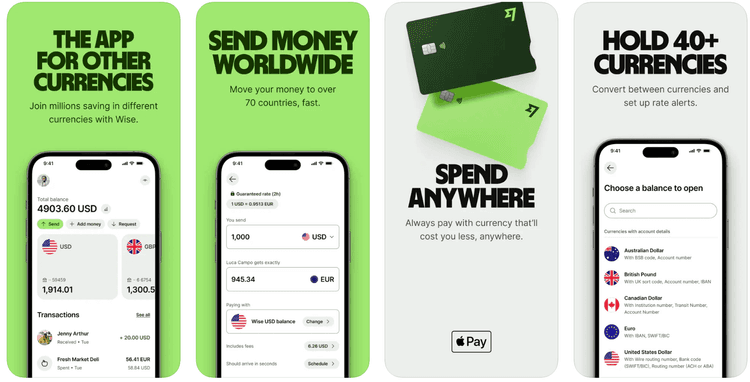
The Wise app is available in 20 languages, on both iOS and Android, and is easy to use with strong customer ratings. Use Wise to send to 40+ countries, with mid-market exchange rates and low, transparent fees from 0.57%. If you need to receive payments from others, Wise can also help with account details in 20+ currencies to get paid conveniently in foreign currencies.
You can also use Wise for day to day transactions and transfers - hold and exchange 40+ currencies, and spend with a Wise debit card in 150+ countries.
Wise is compatible with popular ewallets in the Philippines like Maya and GCash, so you can send from Wise to GCash or Maya. Or you can also fund an international transfer using Wise by paying from your preferred wallet if you’d like to. This means you stay in control of the exchange rate and can often work out to be a very cost effective way of making a cross currency transfer.
Learn more about Wise vs Maya and Wise vs GCash here to help you decide which is best for your needs.

Wise pros and cons
Pros:
Hold and exchange 40+ currencies, and send to 40+ countries
Get paid conveniently to Wise in 20+ foreign currencies
70%+ of transfers are instant (completed under 20 seconds)
Spend and withdraw with a Wise card in 150+ countries
Cons:
No branch network
Wise does not offer features like loans or credit
No cash collection options
App Store | Play Store | |
|---|---|---|
Rating | 4.9 | 4.7 |
Number of reviews | 94,000+ | 1.5 million+ |
Availability | Available | Available |
*Details correct at time of review, 29th October 2025
How to receive money on Wise
To receive money from abroad on Wise you’ll simply need to give the sender either your bank or ewallet information, or your Wise account details, and they’ll be able to set up the payment. The money is deposited right to your account once the payment is processed, with no need for you to take any further action.


Provider 2: PayPal
Fees and exchange rates: International transfers 4.99 USD when funded with a bank account or PayPal balance, with an extra 3.4% fee if you pay by card. 4% currency conversion fee applies
Safety: Safe and easy to use provider with a global network and a long history in electronic payments
Speed: PayPal to PayPal payments can arrive quickly or instantly, but withdrawing the funds to a bank might take a few days
Customer reviews: PayPal is not active on Trustpilot
PayPal has an enormous global user base and is available on both iOS and Android. You can send money from one PayPal account to another in 25+ currencies. Once the recipient gets the money in PayPal, they can choose to hold or spend it, or make a withdrawal to their own bank. In some countries withdrawal fees may apply and there’s usually a charge if you need to convert currencies at any point in the transaction.
PayPal can also be used to send payments to the Philippines to be received in ewallets like Maya and GCash. In this case someone using PayPal can send money in PHP which you can claim as credit to your ewallet to spend later.
Many people have PayPal accounts, so this might be a convenient option if you’re sending money to someone who uses PayPal regularly, or receiving a payment from a PayPal user overseas.
PayPal pros and cons
Pros:
Huge user base - your recipient might already have a PayPal account already
PayPal to PayPal transfers can be very quick if you pay with your balance
25+ supported currencies for holding and exchange
Use your balance to shop online, send to others or withdraw
Cons:
Currency conversions are around 4%
International transfers cost 4.99 USD, with an extra 3.4% fee if you pay by card
Your recipient may need to pay a fee or wait a few days to withdraw the funds from their account
App Store | Play Store | |
|---|---|---|
Rating | 4.8 | 4.9 |
Number of reviews | 6.2 million+ | 3.5 million+ |
Availability | Available | Available |
*Details correct at time of review, 29th October 2025
How to receive money on PayPal
To receive money from abroad on PayPal all you need to do is give the sender your PayPal account information - usually the phone number or email you used when you created your account. The money will be deposited into your account when the payment has been sent with no further action required.
Provider 3: Western Union
Fees and exchange rates: Variable fees and rates depending on the payment type
Safety: Safe to use with normal precautions - Western Union is a large, established and reliable provider
Speed: Some payments can arrive instantly, others may take a few days
Customer reviews: Great score on Trustpilot, 4.2 stars out of 5, from 136,000+ reviews
You can use the Western Union app on iOS and Android in 30 languages, and also set up payments in person. This combination can be handy if you want to pay in cash, or if you’d rather the recipient gets their money in cash. Simply start the transfer in the Western Union app and either pay electronically or in a store, and your recipient can get their money through your chosen remittance agent.
If someone is sending you a payment from abroad to an ewallet in the Philippines like Maya, you can also claim this payment to your Maya account rather than in cash if you would like to.
Western Union offers transfers to more or less any country in the world and has a huge agent network which can make it a very convenient option. Fees do vary, and can include additional costs built into the exchange rate offered, so compare the quote you get with others to help you decide.
Western Union pros and cons
Pros:
Send to almost any country on the planet
Pay out in cash or to a bank account or ewallet very conveniently
Choose from in app or in person services
Some transfers can be very fast, especially when paying in cash
Cons:
Exchange rates may include a markup - a fee
Transfer costs vary, and in person transactions can be more expensive than electronic ones
Not all services are available in all countries
App Store | Play Store | |
|---|---|---|
Rating | 4.8 | 4.5 |
Number of reviews | 1.1 million+ | 140,000+ |
Availability | Available | Available |
*Details correct at time of review, 29th October 2025
How to receive money on Western Union
If you are going to receive money from abroad on Western Union to a bank or ewallet all you need to do is give your details to the sender. If you would like to get your money as cash you’ll need to go to a local Western Union agent, with an ID document and the transfer reference (MTCN) which the sender can give you. The agent will check your details and give you your cash.
Provider 4: Maya
Fees and exchange rates: Rates and fees are set by the third party provider selected
Safety: Safe provider with good security features built into the app
Speed: Speed of payment depends on third party service selected
Customer reviews: Maya is not active on Trustpilot
Maya is available on both iOS and Android and is a very popular ewallet in the Philippines. You can use Maya to send or receive money internationally using a third party provider. If you want to send a payment overseas, you can use Maya to pay for a transfer arranged by another provider like Wise, for example. Or you can use Maya to cash in a remittance sent from someone overseas through a service like Wise, Western Union or PayPal.
Maya has a whole host of features which are also useful for day to day life in the Philippines, including ways to pay bills, save and spend in person and online. As Maya’s features are all in PHP, to transact internationally - including sending a payment abroad - you'll need to use Maya alongside another service.
Maya pros and cons
Pros:
Send or receive payments through a range of third party providers
Ways to receive payments from abroad through partner services in cash
Get a Maya card for spending, pay bills and get other local services with just your phone
Popular local provider which has many users in the Philippines
Cons:
No multi-currency features
Sending and receiving must be done using a third party
Fees may apply depending on the service required
App Store | Play Store | |
|---|---|---|
Rating | 4.6 | 4.8 |
Number of reviews | 220,000+ | 6.2 million+ |
Availability | Available | Available |
*Details correct at time of review, 29th October 2025
How to receive money on Maya
To receive money from abroad on Maya you’ll have a couple of options. If the person sending you money has transferred it in PHP directly to your Maya wallet you can receive it without taking further action. If they’ve sent it as a remittance with a third party you may need to claim it. The process can vary depending on the third party used, and may require you to get a reference number from the sender to enter into Maya to have your money transferred there.
Provider 5: GCash
Fees and exchange rates: Rates and fees are set by the third party provider selected
Safety: GCash is a safe service when used with normal precautions
Speed: Speed of payment depends on third party service selected
Customer reviews: GCash is not active on Trustpilot
You can get GCash for iOS and Android, to open a PHP account for use locally. You’ll be able to send and receive international payments using GCash and a third party provider.
If you’re in the Philippines and want to send money overseas you can use GCash and a service like Wise to send a payment overseas. Or if you’re abroad and need to remit money home, you can use a local third party, or a provider like Wise, PayPal or Western Union to send your payment from a foreign currency to PHP to be deposited to GCash.
Aside from transfers, GCash has a huge range of services like savings and investments, loan and credit.
GCash pros and cons
Pros:
Send money overseas with GCash and a third party
Receive money in a GCash account in the Philippines from abroad
Access a huge range of other financial products and services
Reliable and well liked local provider
Cons:
Transfers sent or received in a foreign currency must be arranged with the help of a third party
Fees and rate markups may apply when you send overseas payments
Transfer times can vary
App Store | Play Store | |
|---|---|---|
Rating | 3 | 3.6 |
Number of reviews | 126,000+ | 3 million+ |
Availability | Available | Available |
*Details correct at time of review, 29th October 2025
How to receive money on GCash
To receive money from abroad on GCash you’ll need to cash in your remittance in the GCash app. To do this you’re prompted to enter information like the amount of the payment and the reference number, and then complete a verification step using a code sent to your registered mobile number.
What is the best app for transferring money?
All of the apps we’ve looked at in this guide have different features which might suit different customer needs. Here’s a round up to help you make your decision:
App Name | Best for | Fees | Speed | Transfer Limits | Availability |
|---|---|---|---|---|---|
Quick transfers with the mid-market rate | From 0.57 % | Often instant | 50,000 using Instapay, or more using PESONet | Available in many countries globally | |
PayPal | Sending to other PayPal users, often instantly | 4.99 USD, with an extra 3.4% fee if you pay by card. 4% currency conversion fee applies | Often instant - withdrawing to a bank can take longer | 60,000 USD (about 3.5 million PHP) | Available in many countries globally |
Western Union | Getting cash quickly to someone in another country | Variable depending on transfer type | Variable depending on transfer type | 820,000 PHP | Available in many countries globally |
Maya | Cashing in remittances in the Philippines | Variable depending on third party used | Variable depending on third party used | Variable depending on third party used | Available primarily in the Philippines |
GCash | Cashing in remittances in the Philippines | Variable depending on third party used | Variable depending on third party used | Variable depending on third party used | Available primarily in the Philippines |
*Details correct at time of review, 29th October 2025
Where we have compared providers this looks at factors like ratings and reviews, as well as feature availability and fees.
Conclusion
Each of these international money transfer apps stand out in different ways - which means the right one for you will depend on the specific service or services you need.
For flexible payments to and from a selection of foreign currencies you may prefer Wise, for example, while Western Union has excellent global reach for cash transactions. Maya and GCash can suit customers transacting primarily in PHP and looking for occasional overseas transfers, and PayPal is a hit with online shoppers who can use their balance to spend around the world.
FAQs
For international payments you could consider an international money transfer app like Wise or Western Union, or send a PayPal transfer to another PayPal account.
Payments made overseas by Wise may arrive instantly, and some Western Union transfers can also be collected in cash in minutes. Most services give a delivery quote before you send so you’ll know what to expect.
The money transfer apps we’ve featured are safe to use with normal precautions like keeping your account information and PIN safe.
In most cases you must sign up for an account and upload an ID document to get verified. You can then send a payment by paying with your bank account or card, and have the money deposited to your recipient’s bank account or ewallet in the required currency.
There’s no single easiest app to send money, but there are plenty to choose from. Compare a few like Wise and Western Union, to see which is the easiest for your specific payment.